Half a year ago I implemented newsletter signups on this website, using Mailchimp. They gave me a code snippet to copy paste onto this website, which had some honeypots (fields in the form that humans should not fill) for protection against bots.
One day later I checked and had around 100 newsletter subscribers. Not bad! I was excited. But then I thought that if it's too good to be true there's something fishy, and I was right. The subscribers were bots. The honeypot protection of mailchimp was not enough.
Then I activated one setting on Mailchimp. It made an email with captcha to be sent to the user before actually adding them to the list. It worked and prevented the bot signups to the newsletter. Good ending right? well... no. After some weeks I began to notice that my domain reputation went significantly down, and the mails I send from my domain mailbox consistently appeared in receiver's spam folder.
I checked some metrics on Cloudflare and found out that my domain email was sending hundreds of emails per day! I had a theory that because Mailchimp was sending so many emails from my address (for the bot captcha verification) the reputation was going down, but because struggled to find info online at the time and had no experience in the field I made this reddit post where others confirmed my suspicion.
That's when I started to think about malicious bots. Those that scrape my content, steal email addresses or just trigger signups. The Mailchimp protection was not enough, I had to find another solution.
Avoiding the Captcha
There are various Captcha solutions available. From Google, Cloudflare and others. I tried to implement the free Cloudflare captcha and it was kind of broken at the moment.
I realized that there are many cons in captchas:
First, you may have to pay for it, and as it tests also bots and not only humans it may be triggered a lot of times and cause you to spend some bucks.
Second, there are rules of when you have to show on your website a cookie consent window, which is something I really try to avoid as it harms experience. Captchas often require this consent window to be shown.
Third, my website is relatively small. For very popular websites Captcha is required. But in my case, do I really want to increase load times by fetching external scripts that do heavy calculations on the page? Do I want people to do this irritating image test? I think it's possible to make some custom validations and my own heuristics instead.
I decided to avoid the Captcha solution.
Protecting the Assets
I came to an understanding that websites contain assets that you have to protect. Your content, the email address or the form signup (wasn't obvious for me at first). Cloudflare has some amazing tools for bot protection, email obfuscation and others, so I enabled some of them.
First, we need to understand what bots we are facing. For an unpopular site such as mine, the malicious bots that I meet are those that just scrape content. No one will spend resources on smart, content loading or AI bots on my domain. Another enemy are bots that fill forms and click on submit buttons (the one's that created the issue in the first place and made the domain value to go down)
Second, what are the assets? My mail address to not get spammed. The website content so bots won't copy paste it into lower quality places. My domain and mail reputation that can be harmed on fake newsletter signups.
What to Defend from?
Now, when we understand the enemy and what we protect, let's think what to do to defend ourselves from possible issues:
Content scraping. Bots may copy my content and post on their website. Search engines can mark my website content as low quality or duplicate because other low quality websites copied and posted the same stuff. Cloudflare has a setting to block bots it deems malicious. Also added canonical url to the html pages, so if bots copy paste the content the html contains my real url address of the page. Those methods seem sufficient in my case, when I have no private content on the website.
Email address. If my mail address will be in plain html the bots will be able to fetch it. Also, I guess it's not that hard to find strings where the @ sign is replaced, like MY_EMAIL (at) gmail.com. The solution is to have the address in the website content hidden (encrypted). The decryption is made using javascript code (that the bots usually won't execute on an unpopular site such as mine).
Form sign up (newsletter in my case). While the Mailchimp honeypot blocks the less intelligent bots, some bypass it. I added other custom heuristics in javascript that try to detect a bot and only after passing all of them the sign up url is decrypted and the form submit option becomes available.
Further Risk Reduction
A good practice is to be able to answer on the question: What if?
What if some bots bypass this sign up protection and trigger my mails? while I don't expect it to happen often, I reduced the risk of reputation damage by separating subdomains and mailboxes for various email types.
The email that confirms subscriptions and does the bot validation is sent from (subscribe - @ - newsletter - MY_DOMAIN) mailbox. The hello email, where I'm sure it is not a bot at this point, is sent from (hello - @ - newsletter - MY_DOMAIN). The newsletter mails themselves from another mailbox at the sub domain. If something goes wrong there is higher chance that the impact will be for the specific inbox, or specific subdomain and not my main domain.
What if a bot is able to fetch my main mail address from the website despite my protections? I will get some spam, most of which will be blocked anyway.
Bots Protection Technical Implementation
Protecting Contact Mail
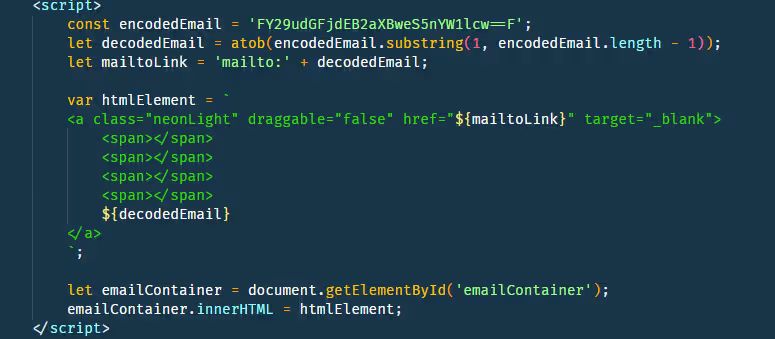
You may view the email protection in the attached image. My contact email is encoded in Base64, with one extra letter in front and behind. Then, in javascript, I decode it and place on the website so it's visible to visitors. It is sufficient in my case because, as you remember, we deal with bots that just scrape content and usually do not execute scripts.
Protecting The Newsletter Signup
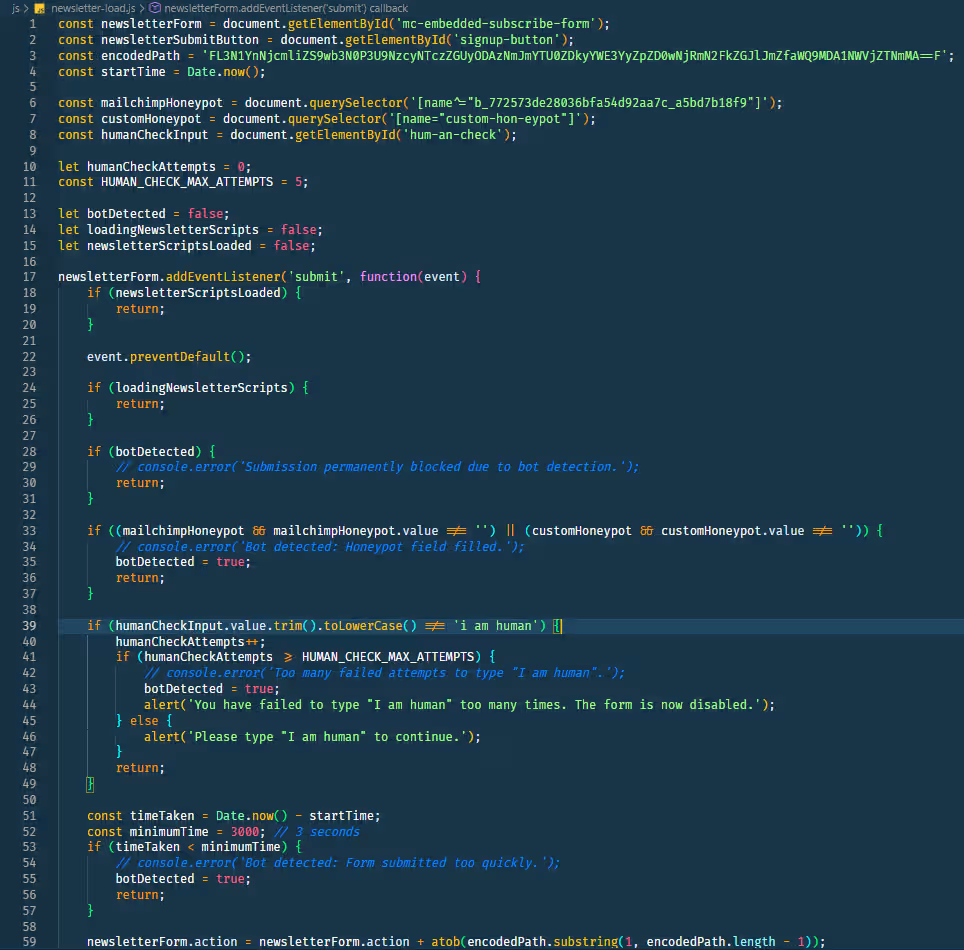
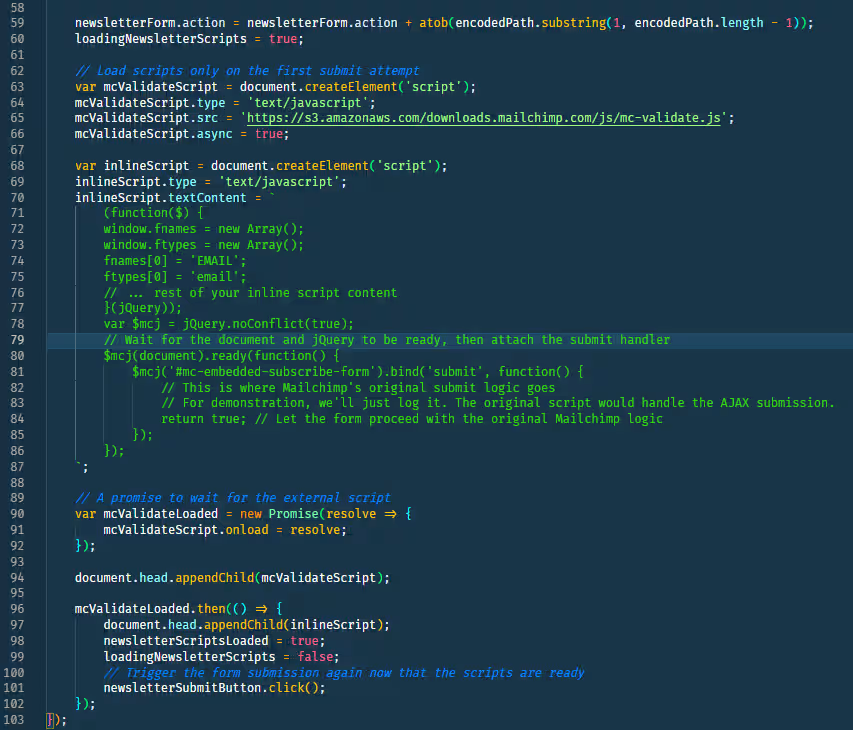
Let's go over the logic. View the javascript code in the attached images below.
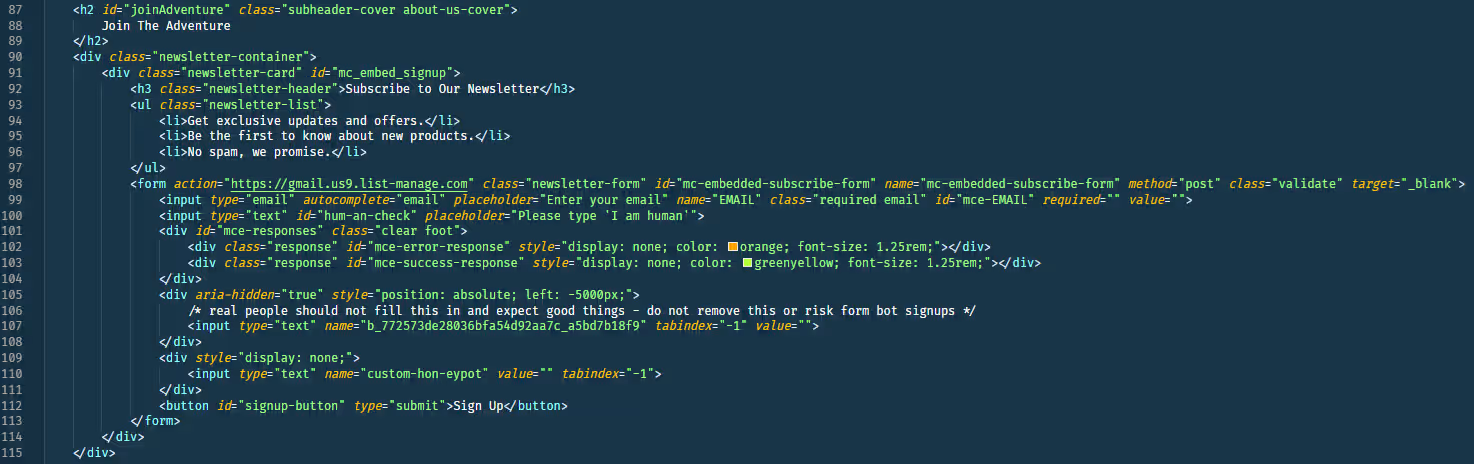
At first, the Mailchimp snippet had the url to trigger the signup process in the html. I removed the parameters from the url and put it, encoded, inside the script. This way bots can't scrap it from the html to trigger mail sending.
Then, I added my custom honeypot. Tried to not use identifying strings (aka honeypot). Because mailchimp is a very popular platform some bots likely know to bypass it, so I added something specific to my website.
And lastly, I added my own heuristics to identify bots. If a visitor bypassed the logic it means that he's human, and then we decrypt the hidden url part and append the parameters back to the html form and submit the request succesfully.
As you see in the images, the tests aren't that complex: If honeypot filled it's a bot. If the visitor failed to type 'I am human' 5 times it's a bot. If the visitor filled and submitted the form too fast it's a bot.
If bot is detected the relevant flag is set and doing page refresh required to try to subscribe again. Only after passing all the tests successfully the required data is appended back to the html to request signup. Feel free to play with it on my newsletter form!
Final Notes
We talked about, sometimes not so obvious, but important things. Website assets and reputation protection, with methods to reduce risk and protect yourself with no captcha.
6 months passed since the event. There are zero bot signups to the newsletter, my domain and email reputation went back up, and seems like no bot defeated my custom defense yet.
The main takeaway is that you should protect your website and email value. Hopefuly the experience, tips and methods I share with you in this guide will help.
This website-email world includes a lot more concepts to dig into except security. For example to ensure that your emails do not appear in the spam folder you may look into implementing DKIM, SPF protocols, or DMARC to monitor errors and issues with your mailboxes. Still, taking security and reputation protection seriously is definitely an important, necessary step for your business and website in general.
Feel free to contact me or ask questions. If you gained some insights this guide was not in vain :)